URL Encoding Explained: Spaces, Plus Signs, and Percent Encoding
The URL encoding is an essential part of web development, particularly in regard to working with URL, query parameters, search forms and user input. You have already found URL encoding if you’ve ever seen %20, %2B, or %3D in the middle of a URL.
These codes can be mystifying at first glance but they come into play. They are used to encoded special characters that can then be added to a URL in a safe manner.
Mastering the understanding of URL encoding is beneficial for developers, website owners, and those who rely on APIs or web applications. In this guide, you can discover the details about URL encoding, spaces and plus signs, percent encoding, and the right URL encoding and decoding.
What is URL Encoding?
URL encoding is a method of escaping some characters in a URL with a percent symbol (%) and two hexadecimal digits. This is referred to as percent encoding.
There are special characters in a URL. Some of these are not acceptable to directly use in some portions of a URL. The way to pass these characters and to make sure they are interpreted correctly is to use this baseline form, known as URL encoding.
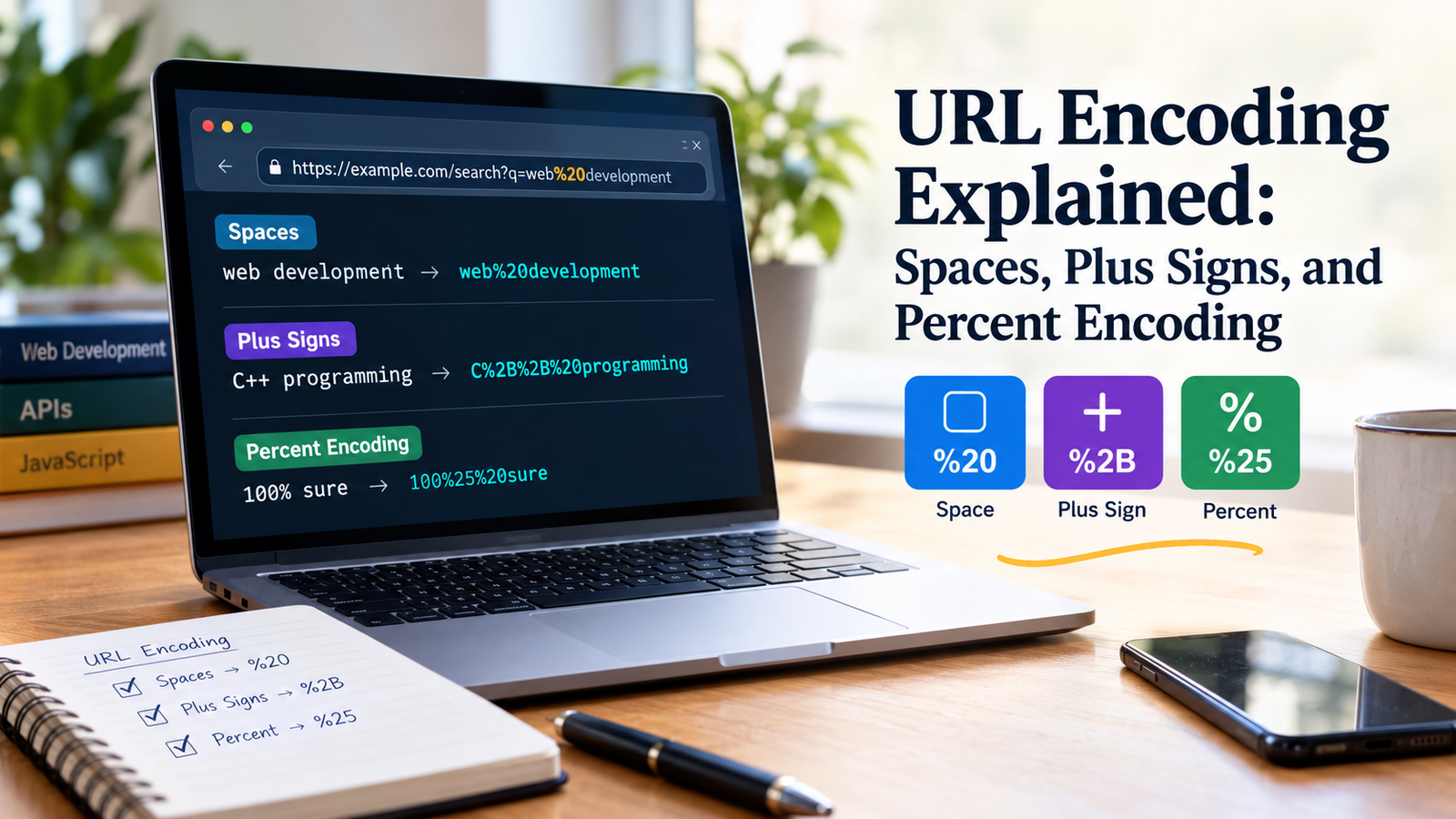
A space can be represented as %20 in a URL, for example.
Consider this text:
hello world
If the space is not used as-is, it is encoded as:
hello%20world
Here are some common characters that will be url-encoded:
| Character | Encoded Form |
|---|---|
| Space | %20 |
Plus sign (+) | %2B |
Ampersand (&) | %26 |
Equals sign (=) | %3D |
Question mark (?) | %3F |
| Hash (“) | %23 |
Percent sign (%) | %25 |
The exact encoding that is needed depends on the position of a character in a URL. Characters which are part of the structure of a URL may or may not require different treatment than the same characters when they are used as ordinary data.
Why Is URL Encoding Important?
Web pages, forms, API calls and inter-app transfers are accomplished through URLs.
If the URL has spaces or reserved chars in it, the meaning of those can vary based on its location and URL component.
For instance this URL:
In some cases the space in the search query is a problem. The space encoded is:
Explicitly defines the space in the query value.
In particular, encoding a URL is useful if you need to:
- Pass search terms by putting them in the URL query string.
- Forward the user’s input to an API.
- Use special characters in query values.
- Dynamically create links in JavaScript.
- Properly process the submission of forms.
- Do not confuse data on / with the structure of the URL.
It should not, however, be used to supplant input validation, HTML escaping or security controls. It addresses one particular issue: to use data in a URL.
How Percent Encoding works:
Percent Encoding requires three characters to represent an encoded byte:
- A percent sign (
%). - The first hex digit.
- Second hex digit.
The space character would be coded at 0x20 in UTF-8, and in several common ASCII-compatible codes. It is represented in percent-encoded format as: %20
For example, the plus sign (+) is represented in bytes as 0x2B and therefore is represented as: %2B.
Let’s take a look at some examples:
- Space:
%20 - Plus sign:
%2B - Ampersand:
%26 - Slash:
%2F
Multiple bytes could be needed to encode non-ASCII characters. For instance, if a character is outside the basic Unicode character set (ASCII), it can be encoded as multiple percent-encoded bytes when using UTF-8.
That’s the reason URL encoding is not always straightforward replacing one character by one code.
No. The meaning of Spaces in URL Encoding.
One of the most commonly used characters in developing a URL are spaces.
You have to deal with two representations often:
%20+
While whitehe is sometimes a substitute for space in some scenarios, these two are not the same thing in all cases.
1. Using %20 for Spaces
The character %20 is the percent-encoded space.
For example:
The value of the query parameter in this URL is web development.
The space between the two words is represented with the %20 sequence.
It is appropriate for use in the representation of spaces in query values and is the representation commonly used for encoding URL components.
2. Using + for Spaces
Plus is a wild card, which matches any space in the application/x-www-form-urlencoded format, which is usually used to make HTML-form posts and pass form-type query-params.
For example:
Using “form style” decoding, this query resolves to:
web development
This doesn’t imply that + always signals’ space’, however.
A literal plus sign in an ordinary URI or URL component can be used to refer to an actual plus sign. The meaning of it is dependent on the rules for encoding and decoding.
3. When Should You Use %20 or +?
Depending on the situation and format, the proper one should be used.
| Situation | Recommended Approach |
|---|---|
| Encode a URL component in JS | Get value from encodeURIComponent() |
| How to encode a value for form query parameters | Use URLSearchParams |
| Percent-encoded space in a component | |
| In order to encode the component you may have to replace a literal plus sign | which is represented by %2B. |
| Decoding form-style query data | Form style query data decoding |
The basic guidelines are to use the same coding and decoding techniques. Please don’t assume that every URL parser will use “+” sign as space.
Understanding the Working of Plus Signs in URL?
If added, plus signs are an error as they have different meanings in different contexts when using a URL.
Consider this value:
C++ programming
Now if you encode it as an argument of a URL using javaScript’s encodeURIComponent(), you will get:
C%2B%2B%20programming
The two pluses are converted to %2B%2B and the space to %20.
This representation ensures that the original text is maintained during correct decoding of this component.
Let’s talk about the following query string now:
?language=C%2B%2B
The query parser used by the form is able to break down the value into:
C++
The pluses don’t get encoded as pluses in the encoded string, as %2B is the encoded version of the plus character.
Why is there sometimes an intervening space between a raw plus sign and the data?
Form-style URL encoded plus sign will be treated as a space when unencoded.
For example:
?q=C++
Many form parsers will end up reading this as C C instead of C++ because treatment of each ‘+’ symbol is space.
Encode literal plus signs, %2B.
A significant distinction this would make would be in programs involving programming languages, mathematical expressions, search terms, numbers related to phone use and any other input that might contain plus signs.
How to encode and decode URLs.URL Encoding and Decoding.
URL Encoding encode data for a specific encoding format or URL component. The latter is the process of URL decoding.
For example:
Encoded value:
hello%20world
Decoded value:
hello world
Another example:
Encoded value:
C%2B%2B
Decoded value:
C++
Usually, the encoding operation is done when creating the urls and decoding operation is done when reading parameters of the urls or processing incoming request.
Decoding however, should adhere to application’s expected format. If the wrong decoding method is used the meaning of the data could be altered.
How to encode URL in JavaScript
JavaScript comes with built-in functions to handle the encoding and decoding of data in the URL. These techniques are generally safer and more reliable than the manual character replacement.
1. Use encodeURIComponent()
The encodeURIComponent(value) function is used to encode a value that is meant to be created as a single component of a URI (e.g., a query string parameter value).
Example:
const searchTerm = "web development";
const encodedTerm = encodeURIComponent(searchTerm);

console.log(encodedTerm);
// web%20development
Then you can add the encoded value to a URL:
const searchTerm = "web development";
const url = `https://example.com/search?q=${encodeURIComponent(searchTerm)}`;

console.log(url);
// https://example.com/search?q=web%20development
This way the spaces and many reserved characters can be included without affect the way the URL itself is constructed.
To use Query Parameters, use the URLSearchParams method.
Building query strings with one or more parameters, a URLSearchParams is a convenient option.
Example:
const params = new URLSearchParams({
  q: "web development",
  language: "C++"
});

const url = `https://example.com/search?${params.toString()}`;

console.log(url);
// https://example.com/search?q=web+development&language=C%2B%2B
Note that the space will be replaced by + and not by `%20.
This is natural, since the “form style” query parameter serialization is the one used by URLSearchParams It also translates actual + signs to %2B.
This mitigates the usual pitfalls of query string variables using spaces, amps, equals signs and other special characters.
To Decode Values, use decodeURIComponent() as shown in #3.
There is also a way to decode a percent-encoded URI component: decodeURIComponent().
Example:
const encodedValue = "web%20development";
const decodedValue = decodeURIComponent(encodedValue);

console.log(decodedValue);
// web development
Also, an encoded plus sign can be translated to:
const encodedValue = "C%2B%2B";
const decodedValue = decodeURIComponent(encodedValue);

console.log(decodedValue);
// C++
Something to be aware of is that decodeURIComponent() leaves the raw + as is. It translates percent-encoded sequences (unless they are part of a plus code to be decoded).
For parsing parameters in the form of a query, use URLSearchParams instead:
const params = new URLSearchParams("q=web+development");

console.log(params.get("q"));
// web development
If you select the proper alternative you will never find yourself in a situation that will give you unexpected results.
Here are some of the common mistakes to avoid when encoding URLs.
Even for experienced developers, encoded data in a URL can be problematic. It is important to know what these problems are in order to write more reliable applications.
2. Treating + and %20 as Always Interchangeable
The plus (+) sign may be used to represent a space in a form-style query string or may be used to represent a literal plus sign.
For instance, %2B is the percent-encoded representation of a literal plus sign in a percent-encoded component.
Remember the format that is being used prior to interpreting a plus sign.
2. Encoding an Entire URL with encodeURIComponent()
encodeURIComponent() is designed to encode only parts of a URL, not the whole thing.
This, for instance, “encodes” this complete URL:
const url = "https://example.com/search?q=hello";
console.log(encodeURIComponent(url));
will encode structural characters such as :, /, ?, =, and &.
This will no longer be a regular URL.
Rather, encode each segment of the URL and use URL-building tools to create the entire URL.
More than one Encoding of Data
Repeated encoding is the repeating of the encoding process on an existing encoded value, e.g. double encoding.
For example:
The output of “hello world” is: “hello%20world”.
The percent sign % is changed to %25 in case it is encoded once more:
hello%2520world
After being decoded, this value results in hello%20world, and not the original value.
To prevent the issue, be aware of whether data is already encoded and encode it if required by the target context.
4. Manually Replacing Special Characters
While replacing spaces with %20 might seem nice, it doesn’t cover all special characters or all Unicode text or other type of encoding edge cases.
For instance, replacing spaces is not safe for a query value containing an amper.
Consider:
name=John&Jane
The ampersand can be used as a separator between query parameters, and not as part of the name.
Manually replacing characters is less reliable than the correct use of URLSearchParams or encodeURIComponent() for the component of the URI that they are applied to.
Extracting values without taking their context into account.
The rules for decoding a URL component and for decoding a form-encoded query parameter are not necessarily the same.
A raw (plus) in query data will not be changed by decodeURIComponent(), but is treated by URLSearchParams as a space in form style query data.
Apply the decomposition correct to the format of the incoming data.
Assuming that URL encoding protects against data attacks.
However, untrusted input becomes safe in not all contexts because of the URL encoding.
It is not free from HTML escaping, SQL parameterization, input validation or even proper security controls.
For instance, if a value is escaped to be used in a url it might need to be escaped again to be used in an HTML attribute.
Treat the data as per the situations in which it will be used.
Best Practices for URL Encoding
Here are some practical tips for working with urls in your applications:
- Utilize built-in methods: rely on the built-in method encodeURIComponent for individual components of a URL, and the built-in method URLSearchParams for query parameters of a URL.
- Encode only values, not full URLs: Structure the URL’s butencode the user-contributed parts.
- Use %2B when a literal + sign needs to be used and preserved in a component.
- Do not double encode: Keep track of the encoding of values.
- Matching Decoding Rules: When decoding ordinary uri components or query strings in the form syntax, pick the right parser.
- Encodes and decodes URIs correctly for Unicode.
- Check input value(s) – Encoding doesn’t necessarily mean a value is legitimate for your purposes.
- Remember the security context: URL encoding is not HTML escaping and other security measures.
These practices will help ease the handling of search forms, API requests, redirects, and dynamically-generated links.
Conclusion
The purpose of URL encoding is to allow for the proper representation of spaces, plus signs and special characters in URLs. Percent encoding works by using the percent sign followed by two hexadecimal digits to represent a byte and form-style query encoding could include plus signs to represent spaces.
The key difference between these is that %20 means the space, while %2B means the literal plus sign. In some cases, a raw + can indicate a space in form-style query data, but is not always so interpreted in other contexts of usage.
When building query strings, use URLSearchParams, not the deprecated encodeURIComponent(), – and encodeURIComponent() for individual URL components for JavaScript development. These inbuilt functions help prevent creating typical encoding errors and make code more trainable.
With the help of these differences, you can craft a URL that is more robust and also understand how to dealing with the user’s input properly and avoid common issues involving query parameters and special characters.
The frequently asked questions (FAQs) are listed below.
What is URL Encoding?
Any character that is encoded in a URL with a percent sign (‘%’) and two hexadecimal digits is called URL encoded. It helps to make certain that characters with special significance are used appropriately in the elements of the URL.
2. What Does %20 Mean in a URL?
The encoded version of a space character is %20. For instance, the string hello%20world is equivalent to the string hello world.
3. What is the reason for using plus sign for spaces in URLs?
Form-style URL encoding emulates spaces by using the plus sign (+). But this behavior isn’t true to all URL contexts. Normally, a space is expressed with %20.
4. What is the meaning of %2B in URL Encoding?
The text is transformed into %2B for a literal plus sign (+). It is handy if you want to keep a plus sign as part of a value, instead of as a space in form data.
5. What is the difference between %20 and +?
The percent encoding “%20” can be used for representing a space, and the “plus” symbol “+” can be used as an alternate for a space in a form-style query string. If needed, literal + needs to be written as %2B.
6. What is the equivalent of Encoding a URL Parameter in JavaScript?
The encodeURIComponent function of JavaScript can be used for encoding a single part of the URL.
const value = encodeURIComponent("hello world");
console.log(value); // hello%20world
If you’re dealing with a query string with several parameters, URLSearchParams may be a handy way to go.
7. How to Decode a URL-encoded String?
Use decodeURIComponent() to decode a percent-encoded component.
const value = decodeURIComponent("hello%20world");
console.log(value); // hello world
Values for form-style query parameters can be decode by using URLSearchParams.
8. What is Double URL Encoding?
Double encoding occurs if it is applied to an already encoded string. For instance, %20 would be represented as %2520, or escaped as % becomes %25. This could lead to some surprises when trying to decode data.
9. When to Encode a Whole URL with encodeURIComponent()?
No, encodeURIComponent() is for use with a single part of a URL, such as the value of a query parameter. The encoding of the full URL can also affect characters used in the URL, such as /, ? and &, which alter its meaning.
10. Do URL Encoding and HTML escaping mean the same thing?
No. URL encoding is used to encode data in URL components and HTML escaping is used to safely represent special characters in HTML content. Using the correct method will vary according to the context in which the data will be applied.
11. Is URL Encoding Considered to Be Data Security?
No, the URL encoding does not make data secure, nor does it automatically secure an application from security attacks. Appropriate input validation and HTML escaping, and other security solutions depending on how the data is being utilized, is still needed.
12. How to prevent the common pitfalls of URL encoding?
Take advantage of built-in encodeURIComponent and URLSearchParams and never encode data twice, be cautious of + of course, and ensure you are using the correct method for the data format.