When to use JSON.stringify() and when to use Manual Escaping?
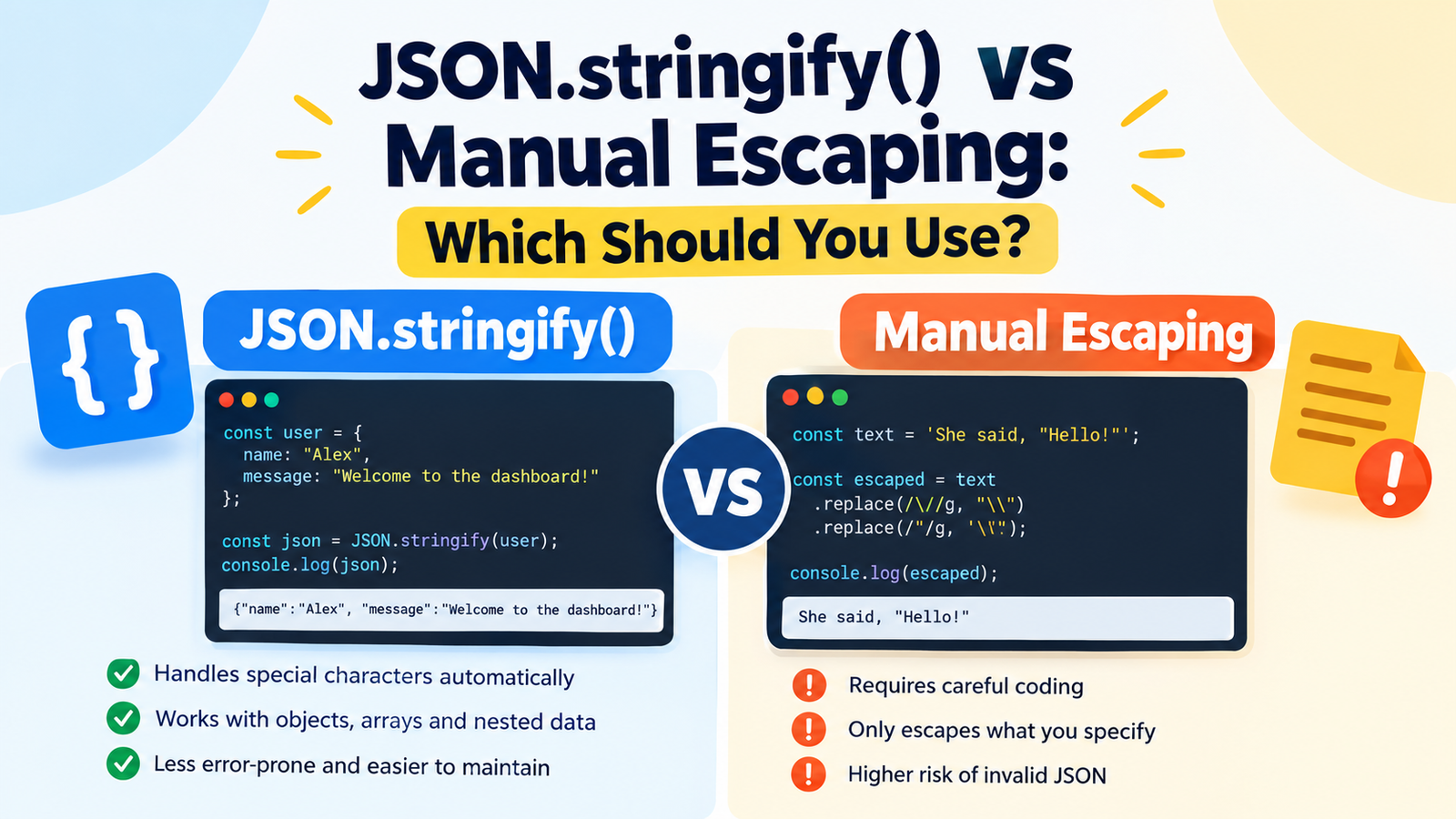
If you make any error when using JSON in JavaScript, you could end up with a failed API call, a corrupted data string, or an error of invalid JSON. There are two common methods to deal with special characters: escaping characters or using JSON.stringify().
Although both have their use cases, using JSON.stringify() is the best way to convert JavaScript data to JSON in nearly all cases where you’re trying to convert JavaScript data to JSON. While this is helpful when working with a text-processing task, manual escaping can be easily wrong when creating JSON by hand.
You’ll find out in this guide how the two methods are different, when each one is used, common pitfalls, and how to properly treat quotes, backslashes, newlines, and nested objects.
Quick Answer: JSON.stringify() vs Manual Escaping
Remove the need to manually escape values by using JSON.stringify()
| Usefulness | Easy to use and reliable | Care needs to be taken in coding |
|---|---|---|
| Lines up with quotation marks | Yes, if correct | Only if done correctly |
| — | — | — |
| Handles backslashes | Yes | Must be handled correctly |
| — | — | — |
| Handles newlines | Yes, in JSON strings | Must be handled correctly |
| — | — | — |
| Is immutable | Yes | Needs to be manually constructed |
| — | — | — |
| When used correctly: Low Risk of invalid JSON | Higher Risk of invalid JSON | |
| — | — | |
| Best use case is: special use cases involving text processing, such as creating JSON from JavaScript data. | ||
| The main distinction here is that the object that JSON.stringify() receives is one that is JavaScript, and returns a representation of it in JSON. You have to tell it which JSON syntax rules to consider, otherwise it will not automatically consider all of them. |
1. What Is JSON.stringify()?
The JavaScript built-in method JSON.stringify() allows you to convert a JavaScript value into a JavaScript Object Notation (JSON) string.
It can accept string, numbers, boolean, array, object, and other supported values of JavaScript. The method takes care of quoting, backslashes and newlines in the value if they are needed to produce JSON.
You can convert an object into a JSON using the following example:
If you have a JavaScript object with a user’s data:
const user = {
  name: "Alex",
  Welcome to dashboard!
};

const json = JSON.stringify(user);

console.log(json);
Output:
{“name”:”Alex”,”message”:”Welcome to the dashboard!”}
The output is a “JSON string,” which is a string representing the original object.
Adding quotation marks around property values is not done manually, commas are not inserted, and the structure of the JSON is not constructed.
Example: Handling special characters
Think of a message with quotation marks and a line break:
const message = ‘She said, "Hello! \nWelcome back.'

json = JSON.stringify({ message });

console.log(json);
Output:
She said, “Hello!”, Welcome back.
Be aware of the escaped quotation marks and new line sequence.
There is a real newline in the original JavaScript string. The JSON output will include a character escape, \n, which is allowed as a string in JSON.
This is especially important because JSON.stringify() will minimize the risk of malformed JSON since you don’t need to code in each of them individually.
2. What is Manual escaping?
Manual escaping is the process of inserting escape sequences in the text before it’s put into a specific format.
Quotation marks, backslashes and control characters need to be represented properly for JSON strings. One way to escape quotation marks and backslashes using a manual approach could be to use JavaScript’s replace() function.
For example:
const text = 'She said, "Hello!"';

const escaped = text
  .replace(/\\/g, "\\\\")
  .replace(/"/g, '\\"');

console.log(escaped);
Output:
She said, “Hello!”
This is an escaped fragment of a string, not a complete JSON document.
You might be able to add it to a JSON structure by hand but you would have to get the quotation marks, the other fields, commas, etc. right.
Why order of replacement is important
In the above example, backslashes are escaped first.
Suppose you first escape the quotation marks, and then escape all backslashes. The new added backslashes can also be escaped and thus alter the result.
This is one of the reasons why maintaining manual escaping can be challenging.
JSON does not validate automatically when escaping it manually.
Consider this example:
const input = 'Hello\nWorld';

const escaped = input.replace(/"/g, '\\"');

console.log(escaped);
The quotation marks are processed but the newline isn’t.
When you put that raw newline in a JSON string literal, it’s bad JSON.
Unescaped control characters, such as literal line-feed and carriage-return, are not allowed in JSON strings.
While manual escaping may be suitable for narrow tasks, a partial replacement function should never be used as a complete JSON serializer.
Compare the differences between JSON.stringify() and Manual Escaping.Make a comparison between JSON.stringify() and Manual Escaping.
The most significant difference between the two approaches is that one is applied at a lower level than the other.
The JSON.stringify() function converts a JavaScript value to a JSON string. Manual escaping is a operation which changes text following a set of replacement rules.
Difference 1: JSON structure
Let’s assume you have a JavaScript object:
const product = {
  name: "Wireless Headphones",
  price: 49.99,
  available: true
};
With JSON.stringify():
const json = JSON.stringify(product);

console.log(json);
Output:
{“name”:”Wireless Headphones”,”price”:49.99,”available”:true}
It supports property names, strings, numbers, booleans and punctuation.
With manual construction:
const json =
  '{"name":"' + product.name +
  '","price":' + product.price +
  ',"available":' + product.available + '}';
This particular example generates a valid JSON for the values given, but breaks when the property contains a quotation mark, backslash, or line break.
For instance, if the name of the product is “Premium “Pro” Headphones,” it needs to be escaped accordingly.
Winner: JSON.stringify() to convert objects and arrays to JSON.
Difference 2: Special characters
JSON strings have special escape sequences:
| Character | JSON representation |
|---|---|
| Double quotation mark | “ |
| — | — |
| Backslash | \ |
| — | — |
| Newline | \n |
| — | — |
| Carriage return | \r |
| — | — |
| Tab | \t |
| — | — |
| Backspace | \b |
| — | — |
| Form feed | \f |
| — | — |
| Other control characters require Unicode escape sequences, e.g. \u0001. | |
| When serializing string values, JSON.stringify() takes care of these requirements. | |
| A manual implementation should consider all characters that need to be escaped, such as uncommon characters that are unlikely to be in normal test cases. |
The two methods of arrays and nested objects.The two types: Array and Nested objects.
In real applications more often than not multiple values are sent.
const order = {
  customer: {
    name: "Jordan",
    city: "Chicago"
  },
  items: [
    { name: "Keyboard", quantity: 1 },
    { name: "Mouse", quantity: 2 }
  ]
};

const json = JSON.stringify(order);

console.log(json);
Output:
{“customer”:{“name”:”Jordan”,”city”:”Chicago”},”items”:[{“name”:”Keyboard”,”quantity”:1},{“name”:”Mouse”,”quantity”:2}]}
The serializer supports nested objects and arrays, and they will be created automatically for you.
Manual escaping adds further potential for commas to get left out, quotation marks to be misplaced or values to be misenterred.
Differences to consider when implementing the system:
Hand-cranked escape may be feasible in a short script. The problem is, it gets difficult to sustain if a new field is added to an application, or if the user enters unanticipated data.
A string could contain, for instance:
- “A person’s name followed by a quotation mark.
- A path like you would use in Windows.
- Multiple lines of text.
- A tab character.
- Copy and pasted from another source.
JSON.stringify() is able to follow the necessary rules for JSON serialization without the need of a new replacement rule for every case.
If you escape manually, it’s up to you to keep those rules.
4. Practical Examples: which method should you use?
Let’s consider some common scenarios that developers face.
For example, you can create a JSON API payload.In example 1 we create a JSON API payload.
Now, imagine that you’re communicating with an API and you need to send a support message.
const payload = {
  name: 'Taylor',
  message: 'I can\'t log in. Please help!'
};

const body = JSON.stringify(payload);

fetch("/api/support", {
  method: "POST",
  headers: {
    "Content-Type": "application/json"
  },
  body
});
The request body is a valid JSON describing the payload.
In any real-life scenario, the endpoint has to be available and the server has to respond to this format.
Because the input is structured JavaScript data, you want to convert it to JSON, use JSON.stringify().
The second example is when you have to manage user generated content.
Assume that a user sends a message as follows:
const userMessage =
  My name is "alex_123"\\support';

const json = JSON.stringify({
  message: userMessage
});

console.log(json);
Output:
{“message”:”The username of my account is “alex_123″\support”}
The output in JSON format is correctly represented with the quotation marks and backslash.
There’s no need to guess at what the user may enter or have a list of substitutions built up.
In any case where a text entered by the user is to be put into a JSON value, use the JSON.stringify() function.
Keep in mind that proper JSON escaping does not take the place of an input validation, access control, or other security mechanism.
Example 3: Use escaping to escape a string for a specific text format.Example 3: Escaping a string for a particular text format.
Not all escaping tasks are made with JSON.
For instance, if you would like to change the double quote characters in a plain text string to a custom display format:
Let text be ‘He said, “Try again.”‘;
const displayText = text.replace(/"/g, '\\"');

console.log(displayText);
Output:
He replied, “Again try.”
Manual escaping might be suitable if you have a specific application that requires this replacement.
But it is NOT guaranteed to be a valid JSON record, HTML page, URL or a string literal in any other programming language.
Try manual escaping when the required format is clearly specified, and the rules of the required transformation are known.
This is a sample of storing JSON data inside JSON.
Another common pitfall is nested JSON.
Assume that there is an object that holds a configuration object:
const config = {
  theme: "dark",
  notifications: true
};

const payload = {
  settings: config
};

console.log(JSON.stringify(payload));
Output:
{“settings”:{“theme”:”dark”,”notifications”:true}}
This is normal nested JSON. It is not necessary to stringify the inner object separately.
Now take another condition: The requirement for this property is that it should not be an object, but a string representation of the JSON representation.
const payload = {
  settings: JSON.stringify(config)
};

console.log(JSON.stringify(payload));
Output:
{“settings”:”{“theme”:”dark”,”notifications”:true}”}
The need for the backslashes is due to the fact that the inner JSON is now a string of text in an outer JSON string.
Both of these are distinct data structures. Select the one, that is necessary by the receiving API.
5. Is Manual Escaping ever better?
Yes but only in particular circumstances.
In cases where the format does not follow the standard conventions, for example, if you are dealing with a custom parser or a specialized text protocol, manual escaping may be helpful. It can also be useful to break out of one character for a specific and clear reason.
But using manual escaping for construction of JSON should not be the preferred approach.
Consider these scenarios:
| Situation | Recommended approach |
|---|---|
| To convert a JavaScript object to JSON: use JSON.stringify() | |
| Convert an array to JSON JSON.stringify() | |
| Use JSON.stringify() to send JSON to an API. | |
| Convert text submitted by the user to a string of serialable data such as JSON.stringify() | |
| Using JSON.stringify() to create nested JSON structures. | |
| Change a character to use a custom text format | Manual escaping (if applicable) |
| — | — |
| Identify and correct an external JSON service’s malformed input | |
| Read a string from a .json file | JSON.parse() |
| — | — |
| These two cases are worthy of special mention. | |
| Repeatedly escaping the JSON may mask the true issue if the external service returns invalid JSON. Determine which part is malformed and if it is a text result, or if it’s returning an incorrect encoding or something else. | |
| Similarly, JSON.stringify() is not a repair function for a pre-existing JSON string. It serializes a JavaScript value, and if you stringify a string that has been stringified, you’ll get a JSON string that contains the string. |
6. Common mistakes to avoid
Although it is generally better to use JSON.stringify(), it is crucial to know what it does and does not do.
Every object should only be stringified once.Error #1: Stringifying an object twice!
Consider this code:
const user = { name: "Alex" };

const first = JSON.stringify(user);
const second = JSON.stringify(first);

console.log(second);
The first call yields:
{“name”:”Alex”}
The 2nd call returns a JSON string with the 1st JSON document:
“{“name”:”Alex”}”
Second result is not a JSON object at the top level. A json string.
When an API is expecting an object, passing the double stringed value may result in a validation error.
How to prevent it: Make sure the data is already a string in the form of a JSON object before serializing it. Don’t repeatedly use JSON.stringify() without a good reason.
Mistake 2: Using JSON.stringify() to parse JSON
This is wrong if you’re trying to convert a JSON text back to a JavaScript object:
const json = '{"name":"Alex"}';

const user = JSON.stringify(json);
In this case, json is already a string. That string is being serialized and not parsed.
Use JSON.parse() instead:
const json = '{"name":"Alex"}';

const user = JSON.parse(json);

console.log(user.name);
Output:
Alex
The difference is easy to explain:
JSON.stringify() turns any JavaScript value into a JSON text.
JSON.parse() is used to convert valid JSON text to JavaScript values.
The most common mistake is to escape the quotation marks and fail to escape backslashes.
A simple substitution could be something like this:
const text = 'C:\\projects\\app';

const escaped = text.replace(/"/g, '\\"');
This is only works for quotation marks. Does not support backslashes or control characters.
Even the resulting string might not be safe to use in a JSON string literal.
To stringify the whole string value, use JSON.stringify():
const text = 'C:\\projects\\app';

const json = JSON.stringify({ path: text });

console.log(json);
Output:
{“path”:”C:\projects\app”}
Mistake 4: JSON escaping is HTML escaping!
Each of the following has different syntax and escaping conventions: JSON, HTML, JavaScript source code, and URLs.
A string that is safely serialized as a JSON string is not necessarily safe to insert into an HTML page or a script element.
For instance, when displaying untrusted text on a web page, use the proper DOM APIs or the correct output handling for each context. Note that JSON.stringify() is not a solution for preventing cross-site scripting (XSS).
Mistake 5: Assuming that JSON.stringify() will save all JavaScript values
JavaScript has more data types than JSON.
Several special values need special attention:
const data = {
  name: "Alex",
  optional: undefined,
  createdAt: new Date("2026-01-01T00:00:00Z")
};

console.log(JSON.stringify(data));
The optional property is not included; the serialization behavior will typically convert the Date value to an ISO string.
The other cases are also important:
Objects typically don’t usually contain – undefined values and functions.
For arrays, undefined and functions are interpreted as null.
Positive or negative Infinity and NaN are serialized as null.
By default, BigInt values will cause a TypeError if no suitable custom serialization strategy is supplied.
Circular references will give a TypeError.
Knowing these differences allows you to prevent unexpected API payloads.
8. How to Ensure Your JSON Won’t Cause Any Errors
If debugging a JSON problem, check the output instead of trying to guess the character to escape.
One way to do this is to convert your data into a string and then back into data:
const data = {
  message: 'Hello, "world"!',
  path: "C:\\projects\\app",
  The following is a sequence of notes: "First line\nSecond line"
};

const json = JSON.stringify(data);

try {
  const parsed = JSON.parse(json);

  console.log("Valid JSON");
  console.log(parsed);
} catch (error) {
console.error(‘JSON validation failed: ‘ + error);
}
When used with a standard, serializable value, JSON.stringify() generates JSON compatible text that can be easily and reliably parsed into a value by JSON.parse().
This round trip check is helpful during development but does not guarantee that your data conforms to a specific API’s schema and/or business rules.
What happens if parsing is still unsuccessful?
When receiving a string from another system that fails to pass to JSON.parse(), be sure to examine these factors:
A. Quotation marks: JSON strings and property names should be in double quotation marks.
2. Trailing commas: Comma after the last item in an object or array is not allowed in JSON.
3. Backslashes: Should be recognizable escape sequences.
4. Control characters: Unescaped control characters are not allowed in JSON strings.
Extra content: A valid JSON document may not have any text that is unrelated to the value before or after a JSON value.
6. Encoding and data format: Ensure that the provided data is indeed in JSON format and not some other JavaScript data structure.
Don’t unconditionally exit a complete wrong JSON document! If you do that, it may result in a valid JSON string, that doesn’t fix what you meant to write.
8. Performance: Is Manual Escaping Faster?
Manual escaping is sometimes selected by developers as it is believed to be quicker than JSON.stringify().
This assumption is not sufficient to validate the additional complexity.
Performance is dependent on the input size, number of fields, whether escaping is required or not, the JavaScript engine implementation, and the implementation. A custom replacement function can perform less work for a specific (narrow) replacement, or it can require more passes over the text, or may contain bugs.
Correctness and maintainability of application code is more important than whatever extra performance might be gained, in most day to day applications.
Try to simulate some of the data using the desired runtime if serialization is truly a bottleneck in a high-volume application. Test the entire process, including validation and manual creation to generate the same result.
A short replacement function does not need to be compared with a complete serializer if they do different amounts of work.
10. Security Concerns: How Serialization Matters
If you get some incorrect JSON construction, it can cause more than a formatting issue.
Unexpected quote marks or control characters can cause the document to have an unintended structure if user-controlled input is placed directly into the JSON string. This may result in the incorrect processing of data or security issues, depending on the use.
Fragile, for example, like this:
const username = userInput;

const json = '{"username":"' + username + '"}';
If userInput includes quotation marks or any other special characters, the outputted JSON may be malformed, or it may be a different type of structure than expected.
A safer alternative is:
const username = userInput;

const json = JSON.stringify({
  username
});
This properly serializes the username as a JSON string value.
The serialization of JSON is not a total security solution, however. Data still needs to be checked, access needs to be controlled, error messages need to be caught, etc., and the correct output-encoding method for the target context needs to be used.
Use parameterized queries for database queries. When outputting html, use the appropriate context. Use the schema and validation rules for the endpoint for API communication.
10. A Simple Decision Framework
If you don’t know what you want to do, begin by asking these questions.
Need to convert a JavaScript object, array or value to JSON?
Use JSON.stringify().
Exporting structured data to an API or JSON?
If you don’t have a library or API client to do the serialization, use JSON.stringify().
Want to edit regular text for a particular custom format?
If the format is reasonably well specified, you might need to escape manually if you are able to implement its full requirements.
Attempting to repair invalid JSON?
Check the original data, find the syntax error and fix the source. Use JSON.parse() to validate the corrected JSON.
Do you need to place JSON within another format?
Apply the right serialization and escaping to each layer. It is not safe to use in HTML, JavaScript source code, or other contexts.
For a lot of developers, that decision-making cycle will end in the same conclusion: If you’re using JSON data, use the built-in JSON methods.
Key Takeaways
The preferred way to convert JavaScript values to JSON is: JSON.stringify().
The Manual escaping process only works for the transformations you explicitly implement.
Quotation marks, backslashes, newlines and other escape characters are all correctly serialized.
Use JSON.parse() to obtain JavaScript values for valid JSON text.
Don’t construct JSON strings dynamically from untrusted data.
Bear in mind that serialization is not a substitute for input validation, schema validation of APIs, or application-specific security mechanisms.
- Benchmark first, in order to select a custom implementation if you need to.
Frequently Asked Questions
- Does JSON.stringify() work well for escaping?
Yes in the case of JavaScript values to JSON. It automatically takes care of the required escaping and the structure of the JSON, so it was less error-prone than building your own JSON strings.
Manual escaping can still be helpful for certain tasks of text processing, such as when not using normal JSON serialization. - Does the JSON.stringify() function automatically escape special characters?
Yes. It escapes characters as per the syntax of JSON strings, such as quotation marks, backslashes and control characters like newlines.
It does not contain all the characters that can be significant in each other format, so there may be some additional context specific handling which still may be required. - Is it possible to make valid JSON using manual escaping?
Yes. To create valid JSON with a manually-written serializer, you should be able to deal with all the syntax, data-type, nesting, and edge cases.
In general, it’s easier and safer to use the built-in serializer for normal JavaScript applications. - Should I escape a JSON string prior to calling JSON.stringify()?
In general, no – pass the original JavaScript string into JSON.stringify and let it take care of the escaping.
If the string is pre-escaped, it may result in unwanted additional backslashes or quotation marks in the output.
Why does JSON.stringify() add backslashes?
The backslashes are used to escape characters in a JSON string. For instance, ” would be a quotation mark in a JSON string, and \ would be a literal backslash.
These escape sequences are not additional characters in the value, but rather a part of the text representation of JSON.
Is it safe to use JSON.stringify() with user input?
It safely serializes user input as JSON values but it doesn’t automatically make user input safe in all other contexts.
However, regardless of this, data still needs to be checked, access limited and used safely when displayed or processed elsewhere. - What is the difference between JSON.stringify() and JSON.parse()?
The JSON.stringify() method converts a JavaScript value to a JSON text. The JSON.parse() function is used to read a valid JSON text and return a JavaScript value.
For JSON compatible data they do opposite operations, except that certain values in the JavaScript language do not retain their identity when serializing and deserializing. - Does manual escaping enhance performance?
Not necessarily. The performance depends on the data, implementation and runtime. A custom implementation might be faster for a more limited task, but can also cause correctness issues.
Test the performance before replacing the built in serializer using representative data. - What is the easiest way to convert an array object to JSON?
The JSON.stringify() method serializes a JavaScript value, it doesn’t necessarily fix broken JSON text.
Use JSON.parse() to recognize invalid JSON, determine the mistake, and fix the data or the data producer. - How to handle the errors returned by an API?
In general, no. Create a JavaScript object or array, and stringify it using JSON.stringify, or utilize an API client that does the JSON stringifying for you.
Most API payloads don’t require manual escaping and can cause needless mistakes.
Which should you use? Final verdict.
Use JSON.stringify() for almost all JavaScript applications to convert data to JSON; only use manual escaping for cases of text-processing.
It makes your code more readable, avoids common formatting errors and supports complex structures without having to keep a custom set of escaping rules.
The purpose is not just to make a string look like a JSON. To generate the right data structure and to maintain the desired values, and to return information in a format that is easily understood by the receiving system.