Double encoded URL and broken Query Strings
In this case it’s a problem very common in JavaScript development – double-encoded URLs and broken query strings. These can result in incorrect search terms, failed API requests and unexpected query value returns. Sometimes a white space in a search query becomes %2520, an ampersand can get split a value into more parameters.
Most of the time these problems arise by applying too much URL encoding, mal-handling special characters, and manually constructing query strings.
But, the best news is that the majority of these issues can be resolved with a little knowledge of how encoding URLs are processed and a quick look at what is built-in for us in JavaScript and that is the URL and URLSearchParams APIs.
In this tutorial you will learn how to resolve double-encoded URLs, how to fix broken query strings, learn some common encoding pitfalls and how to avoid the problem in your applications.
Double URL Encoding: What is it?
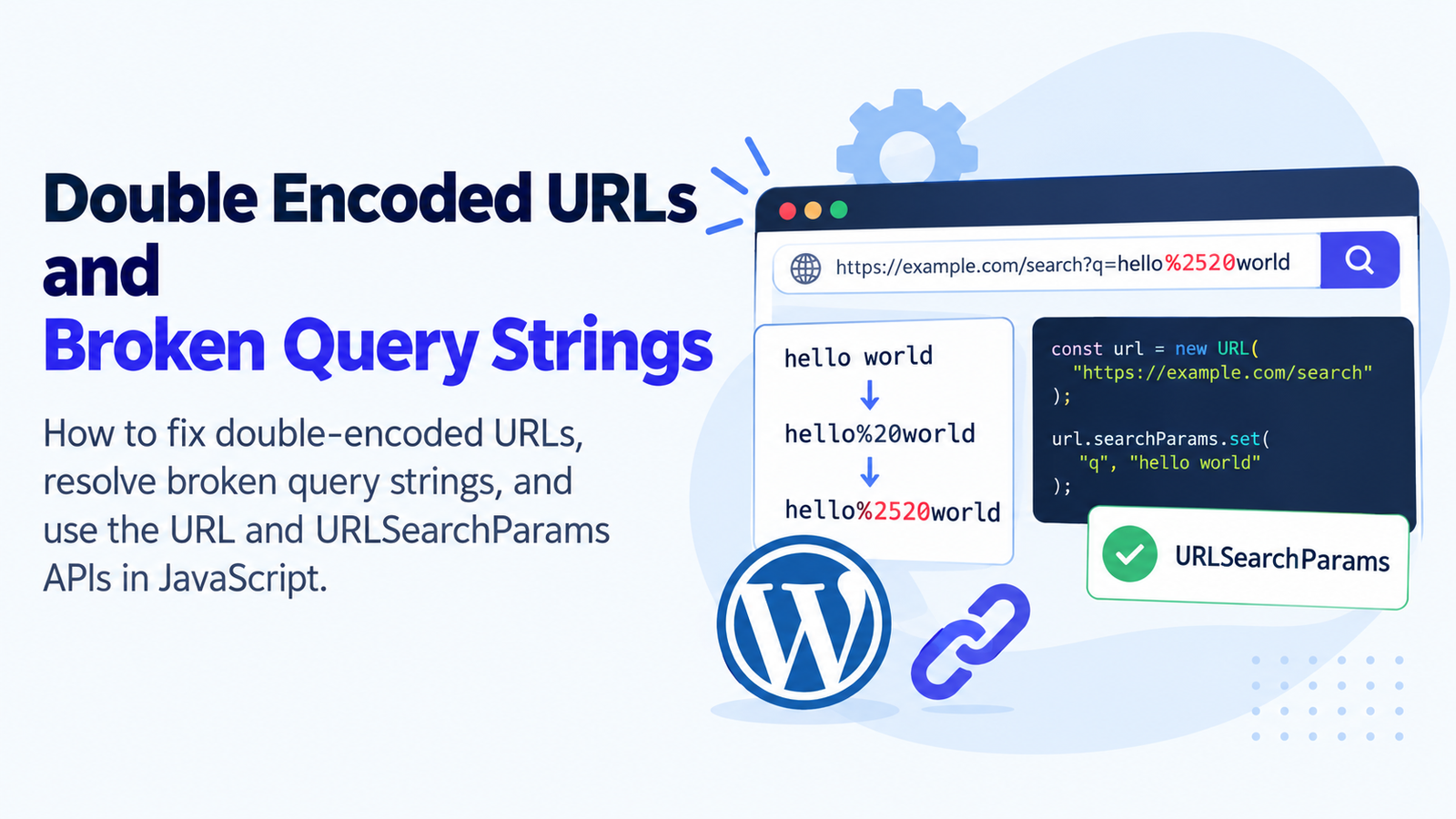
We will see an example of double URL encoding where an already encoded value is encoded once again.
Some characters need to be percent encoded to be safe in URLs, as is done in URL encoding. For instance, if the space character should be part of the value of a parameter, it is commonly escaped as a sequence of percent characters; a space character appears as %20, an ampersand appears as %26.
In the example below, the JavaScript code is used:
const value = "hello world";

const encodedOnce = encodeURIComponent(value);

console.log(encodedOnce);
// hello%20world

const encodedTwice = encodeURIComponent(encodedOnce);

console.log(encodedTwice);
// hello%2520world
The first encoding yields the string hello%20world. During the second encoding, the percent sign (%) becomes %25, resulting in hello%2520world.
This is a typical symptom of double encoding.
Other examples include:
%2520instead of%20%252Finstead of%2F%253Finstead of%3F%2526instead of%26
If you are ever having to debug URLs, you can use these patterns to help identify encoding problems.
What Causes Broken Query Strings?
Any part of a URL after the question mark (?) is called a query string. It includes parameters to pass information including any searching criteria, filters, identifiers and paging information.
For example:
https://example.com/search?q=javascript&page=2Here q is query and page is the current page.
A query string may fail to parse with improper or missing encoding of special characters, and/or improper construction of the URL.
Common causes include:
- Duplication of parameters (such as putting a name into two different field encoders).
- Applying encodeURIComponent to an already encoded value.
- Encrypting the whole URL rather than a particular parameter.
- Manually string appending query parameters.
- Overlooking that
&is used to separate query parameters. - Using a
+instead of a space. - Multiple decoding of a value.
- Combining different values on a front and backend that are either encoded or unencoded.
For instance, if you search for coffee & tea, the ampersand may be interpreted as the separation of parameters and result in trouble.
Once you are aware of these causes, you can better determine which of them you need to approach with the exact fix.
One possible solution for handling double encoded URLs in JavaScript is to use a URL profiler.
The only way to correct double encoding is to track down where the value is being double-encoded. It should be assumed that values that are not encoded are kept within the application and simply encoded when formulating a query string by the URL API.
Avoid encoding values before using URLSearchParams.
This is a typical error: invoking encodeURIComponent() prior to giving the value to URLSearchParams.
Consider this example:
const searchTerm = "hello world";

const encodedTerm = encodeURIComponent(searchTerm);

const params = new URLSearchParams();
params.set("search", encodedTerm);

console.log(params.toString());
// search=hello%2520world
Twice-encoded value. First, here encodeURIComponent() replace the space with %20 Then, URLSearchParams percent-encodes the percent sign once more.
Fix: Directly provide the original value to URLSearchParams.
const searchTerm = "hello world";

const params = new URLSearchParams();
params.set("search", searchTerm);

console.log(params.toString());
// search=hello+world
The output includes the space using the + character which is valid in query strings generated by the URLSearchParams.
It can be obtained back with:
console.log(params.get("search"));
// hello world
This avoids unnecessary coding and simplifies the code maintenance.
2. Only Use encodeURIComponent() as Needed
The encodeURIComponent() function is helpful if you need to encode one component of the whole string, for example, when manually inserting a string value into a URL.
For example:
const searchTerm = "coffee & tea";

const encodedTerm = encodeURIComponent(searchTerm);

console.log(encodedTerm);
// coffee%20%26%20tea
The ampersand gets encoded as %26 so that it becomes part of the search query rather than the query parameters separator.
But be careful not to use manual encoding with another encoding step.
Incorrect approach:
const value = encodeURIComponent("coffee & tea");

const url = `https://example.com/search?q=${encodeURIComponent(value)}`;

console.log(url);
The second call represents an encoding of the percent signs that the first call makes.
A more convenient way to do this is with URLSearchParams:
const params = new URLSearchParams({
  q: "coffee & tea"
});

const url = `https://example.com/search?${params.toString()}`;

console.log(url);
// https://example.com/search?q=coffee+%26+tea
Always use the same approach to constructing query strings; do not combine several encoding methods.
Carefully decode Double-Encoded values 3.
Sometimes it’s not possible to avoid the double encoding from the source as the wrong URL has been stored, generated or received from another application.
If so then decoding may be required.
For example:
const value = "hello%2520world";

const decodedOnce = decodeURIComponent(value);

console.log(decodedOnce);
// hello%20world

const decodedTwice = decodeURIComponent(decodedOnce);

console.log(decodedTwice);
// hello world
Showing how two decoding steps undo two encoding steps.
DO NOT, however, double-decrypt all values. Repeated decoding of a percent-encoded sequence can modify its meaning, as such a sequence might be intentional data.
For instance, the pointing slash / could be represented by %252F. Repeatedly decoding to determine the requirements of the application without having an understanding of the application might result in security or routing issues.
A better way is to find out what is causing the additional encoding and fix it at that point. When you have to repair existing data, only decode as many times as the data requires and verify that what you are going to decode is what you expect it to be.
4- Do not write a full URL.
One other frequent mistake is to use the encodeURIComponent function on a full URL.
For example:
const url = "https://example.com/search?q=hello world";

console.log(encodeURIComponent(url));
This is for characters which are part of the URL’s syntactic structure, such as colon, slashes, question mark, equals.
It is no longer a simple URL which you can use directly as a navigation address.
Instead, you should assemble the URL with the URL API, and pass in the query parameters as separate properties:
const url = new URL("https://example.com/search");

url.searchParams.set("q", "hello world");

console.log(url.toString());
// https://example.com/search?q=hello+world
This keeps the query parameter value encoded in a safe manner while maintaining the structure of the URL.
To fix the broken query strings, you’ll need to write a bit of code.
Query strings cease to work correctly for a number of reasons, double encoding is one of them. Other potential issues are incorrect separators, unescaped characters and manual string concatenation.
Here are some helpful hints for fixing them.
Do use URLSearchParams instead of manually concatenating strings for URLs.
Constructing query strings by hand can be problematic if values have spaces, ampersands and question marks or other special characters.
For example:
const search = "coffee & tea";
const page = 2;

const url = `https://example.com/search?q=${search}&page=${page}`;

console.log(url);
The outputted URL has an ampersand within the query. A query string parser might also recognize it as the start of a new parameter and thus provide false results.
Use URLSearchParams instead:
const params = new URLSearchParams();

params.set("q", "coffee & tea");
params.set("page", "2");

const url = `https://example.com/search?${params.toString()}`;

console.log(url);
// https://example.com/search?q=coffee+%26+tea&page=2
The ampersand that you put inside the search term is now encoded properly and the page argument continues to be a standalone argument.
2. Fix Spaces and Plus Signs in Query Parameters
Spaces and plus signs can be tricky since the query strings that are constructed with URLSearchParams will use a plus symbol to represent spaces.
For example:
const params = new URLSearchParams();

params.set("q", "JavaScript tutorials");

console.log(params.toString());
// q=JavaScript+tutorials
This is a valid representation of the query string.
But when a literal + is to be included in the value, it can be processed with %2B.
const params = new URLSearchParams();

params.set("q", "C++ tutorials");

console.log(params.toString());
// q=C%2B%2B+tutorials

console.log(params.get("q"));
// C++ tutorials
Do not replace spaces with plus characters, or plus characters with spaces, by themselves. This can compromise places in which plus signs are considered as elements of the code.
4. Create New URLs from an Object
If an existing URL has query parameters, you can use the existing ones without having to split the query string yourself.
For example:
const url = new URL(
  "https://example.com/search?q=javascript&page=2"
);

const params = url.searchParams;

console.log(params.get("q"));
// javascript

console.log(params.get("page"));
// 2
This is more reliable than manually splitting strings on ‘&’ and ‘=’ as parameter values can have encoded characters.
To update a parameter you can use the same API:
const url = new URL(
  "https://example.com/search?q=javascript&page=2"
);

url.searchParams.set("page", "3");

console.log(url.toString());
// https://example.com/search?q=javascript&page=3
No changes are made to the existing parameters; only a change in the selected one.
Checks that there are NO spaces or NO wrong query separators.
The basic URL convention is that a query string is started with ‘?’ and the different parameters are separated with ‘&’.
For example:
https://example.com/products?category=books&page=2If another question mark is used accidentally to add a parameter the result can not always be as expected:
https://example.com/products?category=books?page=2In this URL, the value of page=2 is appended to the previous query value, instead of being a distinct query value.
The correct URL is:
https://example.com/products?category=books&page=2The URL API prevents these errors:
const url = new URL("https://example.com/products");

url.searchParams.set("category", "books");
url.searchParams.set("page", "2");

console.log(url.toString());
// https://example.com/products?category=books&page=2
Return a repeatable query parameter as a collection.4. Support Repeated Query Parameters (as a collection).
In some cases one query parameter may occur multiple times in applications.
For example:
https://example.com/search?tag=javascript&tag=web-developmentThe method call get() returns the first value that matches and the method getAll() returns all values that match.
const params = new URLSearchParams(
  "tag=javascript&tag=web-development"
);

console.log(params.get("tag"));
// javascript

console.log(params.getAll("tag"));
// ["javascript", "web-development"]
If your application is designed to return a number of values but is only returning one, it may not have to do with URL encoding. This could be due to the reading of query parameters.
Depending on the structure that the application expects, select get() or getAll().
How to Debug Double-Encoded URLs
If a URL is looking suspect, don’t necessarily decode all of the parameters. Because, at each phase of your application, you are going to want to check your URL.
The first step is to check the Original Value.
Always compare the value prior to encoding.
const searchTerm = "hello world";

console.log(searchTerm);
Make sure that the original value is not already encoded by another previous function/call and is correct.
Ask each student to review the Encoded Value.
Test to see what will happen when it is attached to the query string.
const params = new URLSearchParams();

params.set("q", searchTerm);

console.log(params.toString());
For this example, the result should be:
q=hello+worldIf you’re seeing %2520, then look to see if the value was perhaps already rendered in that form.
Step 3 – Check out the Parsed Value
Get the value of the parameter and compare it to the original value.
const parsedValue = params.get("q");

console.log(parsedValue);
// hello world
If the “%20” character is found in and not in the parsed key, then the input string may have been encoded before being thrown into the query string.
Step 4: Review All Encoding Steps
Look in your code for functions that look like:
encodeURIComponent()encodeURI()decodeURIComponent()URLSearchParams()URL.searchParams.set()
Identify the function that gets the value and the function that builds the value.
The intention is to make the rule absolutely clear that values should always have a known encoding state, with encoding occurring at the boundary of each component.
Special Characters 5: Test
Check your URL-Building Code with values that contain:
- Spaces
- Plus signs
- Ampersands
- Equal signs
- Percent signs
- Question marks
- Unicode characters and emojis can be supported.
These tests are designed to help find problems that aren’t seen with regular text.
The following are frequent URL encoding mistakes to avoid.
Even seasoned developers can write query string buggy code if query string assignments are not obvious.
Multiple Times, Single Value
Do not (re)use encodeURIComponent on the same value without first examining the format of the value. When constructing query strings, prefer to pass in raw values to URLSearchParams.
A warning against leaning too quickly on the left, without realizing the true nature of the values.
Avoid using decodeURIComponent() multiple times, until it looks like something you want to read. Decrypt only if it’s needed and in the form that is expected.
Combining various URL-building approaches
Combination of string concatenation, manual character replacement and use of URL APIs can make bugs more difficult to pinpoint. Pick a uniform approach to building URLs.
Assuming Every Percent Sign Indicates Double Encoding
Percent encoded %25 is just a normal part of percent encoding. For instance, %2F is the slash, and %25 is the actual percentage symbol, for a literal percent sign.
Please do not think of every encoded character as an error – double encoding should be diagnosed by looking at how the value changes through the application.
Ignoring Backend Parsing
At times this is generated by the front end, but the backend is decoding or parsing the parameter incorrectly. Examine the decoding of incoming query strings on the server first, not the front-end.
The following practices can help prevent problems due to URL encoding.
Use these practices to ensure more reliable URL handling.
- Ensure that values are not internally encoded. Use regular strings elsewhere until it is necessary to create or send the URL.
- Query strings should be used via URLSearchParams. It’s consistent in its query parameter encoding/parsing.
- Use the URL API for complete URLs. It assists to maintain the separateness of the URL structure and its components.
- Only encode the correct component. When encoding a component, only use
encodeURIComponent(), rather than<script>encodeURIComponent(‘http://a.b.com’)</script>. - Avoid repeated decoding. Decrypt values if they are known to be in a particular format and at a certain stage of operation.
- Validate incoming data. Ensure that parameters are compatible with your application’s format expectations.
- Test special characters. Test Spaces, Ampersands,.Per cent, Plus and Unicode characters.
- Test frontend and backend functionality. Encoders and decoders must agree on the times when data are encoded and decoded at each end.
These allow you to avoid improperly shaped query strings, unexpected values for your parameters, and foolish encoding bugs.
Conclusion
Double encoding of the URL and poor query string construction tend to happen when URL encoding is used more than once, query strings are not put together properly, or special characters are mistaken as separators.
Using the built-in APIs for manipulating URLs, the most reliable approach would be to use the APIs that javascript provides and leave the values originals and not encode when there is no need for it.
If you are dealing with an existing issue, check the original value, the generated URL and the parsed value. This creates a better opportunity to find the specific instance of when the data differs.
You can now create more robust search forms, API calls, filters and navigation links without breaking query parameter values, following a consistent approach to handling URLs.
These are some frequently asked questions (FAQs).
What is Double encoded URL?
Double encoded URL is a URL where the value has been URLEncoded twice. For instance, %20 may be translated to %2520 since the percent sign is translated to %25 for the second encoding step.
2. How to correct a double encoded URL with javascript?
First of all, determine where the same value is being written twice. Don’t pass a raw value to URLSearchParams by calling on encodeURIComponent() first. When the decoding is required and the value is double encoded, first find out if the value needs decoding and if so, fix the encoding at its source.
3. Why does %20 become %2520?
The code %20 is the escape for a space. The result is that if you encode the entire value, the percent sign becomes encoded as %25, so that the whole thing becomes %2520. This typically results in the same value being encoded multiple times.
4. What is the difference between encoding uri as a whole, and encoding uricomponent?
encodeURI() is used to encode an entire URI; it keeps the characters used to provide the structure of a URI, such as query parameter delineators like “=” and “&”. encodeURIComponent() is used for encoding individual components of a URI, such as: the value for a query parameter, and it encodes those characters if they are present in the value.
5. What can I do if my query string gets broken?
Easily create, append, and modify query parameters with URLSearchParams. Reliably encodes the values of parameters, including handling separators between parameters.
6. Am I breaking a query parameter in my ampersand?
An ampersand (&) separates query parameters. It can be considered as a separator value if it is located unencoded within a value. Be sure to escape the value using URLSearchParams to get the percent encoding for the ampersand.
8. With URLSearchParams can you avoid double encoding?
It’s a foil for many common errors that occur during encoding when you provide it with some original value that hasn’t yet been encoded. It doesn’t, however, automatically recognise if the string is already coded or not. An encoded value can still be passed through it resulting in double encoding.
8. Is it advisable to “double decode” a URL if both are twice encoded?
Not automatically. Blind decoding values (even if you know it was encoded twice) can alter the meaning or create new security concerns while double decoding may be appropriate if you are certain that the value was encoded twice. Find the source of the problem and decode only as needed.
9. Why is the plus sign (not %20) used as the value for spaces in the URLSearchParams?
When you call URLSearchParams.toString(), the returned string is formatted according to the application-specific “application/x-www-form-urlencoded” serialization format, which replaces spaces with the + sign. This is true for query strings processed in this manner. Literal + is represented as %2B.
100. How can I determine if a URL is validly encoded?
Check the original value and construct the URL using URL or URLSearchParams and check parameter back value parsing recovers the original value. Try the special characters like spaces, ampersand, per cent, plus and Unicode.
11. Are there API errors with double URL encoding?
Yes. If an API expects a space, but gets the literal characters %20, it may return a wrong result or even fail to return a result. Other encoding issues are possible to alter such parameters.values or disorient routing as well as request processing.
12. Are URL encoding and HTML escaping same?
No. HTML escaping helps prevent characters being interpreted as HTML markup and URL encoding makes data suitable for particular parts of a URL. They are able to solve different problems and they should be applied in the context of the data to be used.