The easiest way to make surrenders or –< >/ seem like normal text in HTML.
HTML Special Characters can create strange issues if used to display user input, when used to insert text to HTML or build web applications with user input. Special characters like <, >, &, and the quotation marks have special meaning in HTML; if these characters are not used properly, they can break your HTML and/or cause security issues.
If you’re developing websites, knowing how to escape HTML special characters right is a vital item to learn. It lets you render text as you expect, prevent common HTML formatting mistakes, and use it to prevent cross-site scripting (XSS) attacks on your application. The easiest way to make surrenders or -< >/ seem like normal text in HTML.
In this guide you’ll learn what HTML escaping is, what characters need to be escaped, how HTML entities work, how to escape special characters safely in JavaScript, PHP and Python.
What is HTML Escaping?
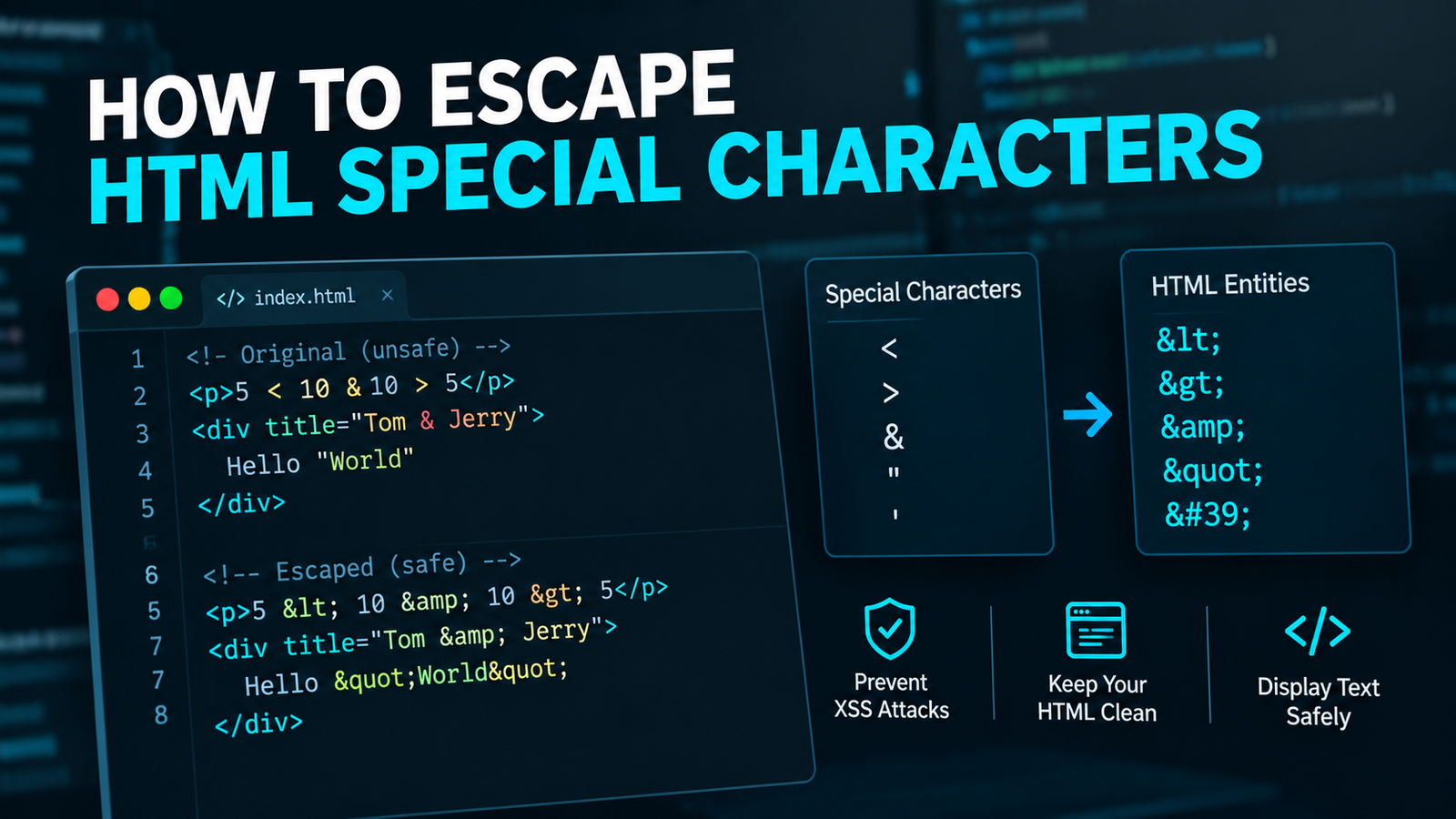
HTML escaping replaces special characters with HTML entities that make sure that the browser will interpret these characters as text instead of HTML code.
Example: Less than (<) is used to begin an HTML tag. For a regular display of this character use < instead.
Consider this example:
Original text:
<p>5 < 10</p>Escaped text:
<p>5 < 10</p>The “escaped” version will escape the less-than symbol and cause the browser to show it as a character, instead of read it as an HTML tag.
HTML escaping is particularly useful when: Creating dynamic web pages, Coding Examples, Rendering Text from Database input, or displaying User-generated content.
What makes it important to escape HTML special characters?
HTML escaping will prevent rendering problems and security threats.
Here are the most important things to know when considering its usage.
1. Prevent Broken HTML
If a special character is placed improperly without proper escaping, then it can cause interference with the HTML tags and attributes.
When a string includes the quote mark character, an HTML attribute can tear apart when it’s part of a quoted HTML attribute value.
You can help maintain the desired HTML structure by escaping appropriate characters.
Prevent Cross-Site Scripting (XSS) Attacks
Cross-site scripting (XSS) is a security flaw that lets hackers run unwanted JavaScript in another person’s browser.
For instance, if it’s an input, the attacker could pass in the following:
<script>alert('XSS')</script>This string could be an executable piece of code in the browser if it is embedded in an HTML document directly by the application.
If the same input is properly escaping an HTML text context, it should not generate a script element, but should render as text.
But, escaping must match with the output context. JavaScript, CSS, and not all URL contexts will be escaped with HTML escaping alone.
Write special characters properly.
HTML entities are used to show symbols, reserved characters, and text with characters that are similar to markup.
For example:
<p>Tom & Jerry</p>To create a container use the <div> tag.
The browser displays:
Tom & Jerry
Create a Container: use <div>.
Good for tutorials, documentation, code samples and content management systems.
The common HTML Special Characters and Their Entities are as follows:
HTML displays » special characters by named or numeric character reference.
Here are some popular HTML entities that you’ll find in the following table.
| Character | HTML Entity | Purpose |
|---|---|---|
| & | & | Ampersand |
| < | < | Less-than sign |
| > | > | Greater-than sign |
| “ | " | Double quotation mark |
| ‘ | &39; | Apostrophe or single quotation mark |
| Non-breaking space | | Space which does not cause a line break.Space which does not at the end of a line break. |
| © | © | Copyright symbol |
| ® | ® | Registered trademark symbol |
| € | € | Euro symbol |
The semicolon should NOT be omitted after the HTML entity. By using the full spelling of the entity, a clear reference to the character is obtained and there will be no parsing problems.
What are the characters that require escaping?
The symbols needed for escape are dependent upon the text location.
The most important characters are:
- To use the ampersand (&) in a character reference (rather than as a shorthand for the phrase “and”): Escape it with &.
- Less than sign (<): Escape with less-than sign, to keep it from being interpreted as the start of markup.
- Greater-than sign (>): Usually escaped as > (for consistency) but this is not always necessary in normal text.
- Quotation marks should also be copied inside of an HTML attribute, such as inside the “bookmark” attribute. Use pair of ” and ” to escape ” and ‘ in double-quoted attributes and single-quoted attributes, respectively.
Most of these characters are escaped by a reliable escaping function that is aware of the HTML context.
To fix the HTML special characters in the code of course.
To correct HTML special characters in javaScript code of course.
Developers frequently want to use dynamic text on web pages in JavaScript. Often, for regular text, the best solution is to not construct HTML strings; instead to use properties on the DOM that are intended for text.
Method 1: Use textContent
The textContent property adds text to the document without processing the text as HTML.
Example:
const userInput = "<script>alert('Hello')</script>";

const output = document.querySelector("output");

output.textContent = userInput;
Where there exists an element with the attribute ID output in the HTML text, the HTML string provided will be printed as text within the browser.
Does not generate a script element based on input.
The method is typically better if you just want to show untrusted text on a web page.
Programming method from HTML Editor and HTML Document Object Model: Instantiate an HTML escaping function.
Sometimes the escaped string is what you actually need such as when you are creating HTML for a trusted template in another process that really does require an HTML escaped value.
This is accomplished by using a mini function for basic HTML text and quoted attribute escaping:
function escapeHTML(value) {
return String(value).replace(/[&<>"']/g, (char) => {
const entities = {
"&": "&",
"<": "<",
">": ">",
'"': """,
"'": "&39;"
};
return entities[char];
});
}Here is the string $input = ‘<p title=”Hello”>Tom & Jerry</p>’;
console.log(escapeHTML(input));Output:
<p>&apos;&apos;Hello' is the title of the warning on the page.The title of the page is &apos;&apos;Hello' - Tom & Jerry.The output does not include any active markup characters, but rather HTML entity references.
This is a simple function that can be used with simple HTML text and quoted-attribute literals. Not a one-to-everything JavaScript, CSS, URLs or anything.
A Trusted Templating System, Method 3.
In larger applications, using a Templating Engine that includes automatic HTML escaping for the context may minimise the possibility of errors.
For instance, many contemporary template engines assume that the values to be interpolated are escaped. But behavior can differ depending on the context of stream production, template syntax and engine.
Do not uncheck automatic escaping or set untrusted content as safe without a good, secure reason.
This is how to escape HTML Special Characters in PHP.
Special HTML characters can be converted to HTML entities using the following PHP built-in function.
It is frequently used for presenting the user Something in HTML.
Example:
<?php
$userInput = '<script>alert("Hello")</script>';

$safeOutput = htmlspecialchars(
    $userInput,
    ENT_QUOTES | ENT_SUBSTITUTE,
    'UTF-8'
);

echo $safeOutput;
?>
Output:
<script>alert("Hello")</script>The string is shown as text rather than script element.
A good understanding of PHP Parameters.
The following are three crucial arguments used in the example:
- ENT_QUOTES: This option will convert single and double quotation marks into HTML entities.
- ENTS_SUBSTITUTE: Substitutes for invalid encoding sequences, instead of silently rejecting the input affected.
- UTF-8: An encoding scheme for writing out a string.
When working with international text and symbols, it is crucial to use the right character encoding.
When it comes to standard HTML output, htmlspecialchars may be enough. In case you have a long string of named HTML entities or if you need to encode more characters PHP has htmlentities() too.
Don’t escape the same value over and over in your application but escape the values when inserting them into the output.
The Python way to escape HTML special characters can be tricky.
The escape.html.magic with Python is not very intuitive.
The html module is a convenient module included in Python for handling html entities.
html.escape() can take a string and escape any characters that could be problematic in HTML.
Example:
import html

user_input = '<script>alert("Hello")</script>'

safe_output = html.escape(user_input, quote=True)

print(safe_output)
Output:
<script>alert("Hello")</script>The argument true=TRUE also is not quoted, which means it is also appropriate for arguments in quoted HTML attribute values.
The html.escape() function escapes any characters that are by default followed by < or > or & or ” as opposed to occur in a string without being followed by such characters. It also escapes single quotation marks with the quote=True argument.
Use Python HTML escaper when?
Python HTML escaping comes in handy in the following cases:
- Creating HTML replies in a Web application.
- Showing other people’s feedback or messages.
- Generating HTML reports.
- Displaying untyped HTML content.
In the event that you use an ORM like Django or Flask, and a template engine that supports escaping features, utilize the automatic escaping ones wherever they are obtainable. Don’t escape any values twice or turn off template escaping for no good reason.
HTML Escaping vs. URL Encoding.
HTML escaping is a different process than URL encoding. The selection of the wrong one may result in broken links or vulnerabilities.
HTML escaped – provides a representation of characters appropriate to an HTML output context.
URL encoding is a process used to encode data so that it can be passed in a URL field, like a query parameter.
For instance, a search term:
Tom & Jerry
When the ampersand is used in an HTML attribute, the ampersand might have to be displayed as &.
The ampersand character is used to separate the query parameters in a URL and cannot be used as part of the parameter value, instead the search term would need to be URL-encoded as a value for one of the query parameters.
There are several ways to do this in JavaScript:
Let searchTerm be equal to the string “Tom & Jerry”;
const encodedTerm = encodeURIComponent(searchTerm);

console.log(encodedTerm);
Output:
Tom%20%26%20JerryYou might also have to escape the resulting URL for use as an HTML attribute context when writing the resulting URL into HTML.
The principle is that the data should be encoded for the target location where it is going to be used. HTML escaping does not do URL encoding, and vice-versa.
Some HTML escaping errors to steer clear of:
It is easy to make mistakes when running away from dynamic content, even for seasoned developers.
There are a few common issues and some tips on how to prevent them.
1. Escaping Only Some Special Characters
Escaping only < and > may not escape ampersands or quotation marks.
A string with an ampersand can be interpreted as a character reference if the text that surrounds it looks like a character reference.
Better approach: Use a trusted HTML escaping function, one that deals with the characters required by the target environment.
3.To escape Text from Inserted Text After Inserting It Into HTML
If untrusted data entered into an HTML string is not escaped, then an application might already have produced an unsafe output.
Better approach: Apply textContent to plain text or escape values whenever they are passed into a context of HTML output.
Prevents the double escape for HTML entities
If a value is escaped two times or more, it’s called double escaping.
For example:
- Original: &
- Escaped: &
- Double: &
If the value has been escaped twice by the browser it will display the escaped & sign.
Better approach: Determine if a value is raw text or already encoded for a particular output context. Indeed, break free from it at the right output edge.
4. HTML Escaping in JavaScript.
Especially, the same rules of HTML escaping do not apply if the value is in HTML string or HTML script element (<script language=”JavaScript”>...</script>).
But JavaScript has its own escaping rules and syntax, and critical $ values in executable code are dangerous to embed untrusted values in.
Good solution: Keep untrusted data out of the middle of a JavaScript program. Avoid insecure DOM APIs—use a supported method for passing data to scripts from the framework you are using.
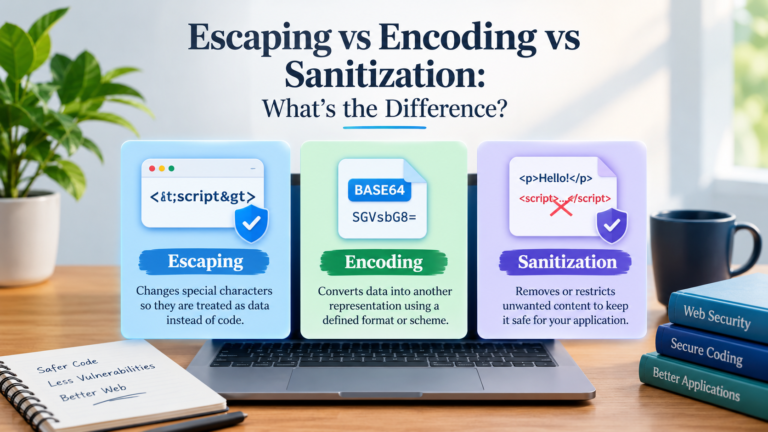
5. Identifying the problem of escaping and the problem of sanitizing as one.
The use of escaping and sanitization are different.
The escaping of characters to be understood in a certain output context. Content is deleted or restricted based on a procedure that defines what is considered as “sanitized” content.
For instance, if you are looking to provide plain text, then HTML escaping might be required. Working with a good and trusted HTML sanitizer that is setup with an explicit list of allowed HTML formatting tags is likely the only way to enable notaries to use some HTML formatting.
Do not trust arbitrary HTML because you have taken off one or more tags, or because you have inserted a few characters.
To understand best practices refer to the escaping of HTML Special Characters.
Based on these ground rules, here are some tips for making your Web applications more reliable and safe.
- Consider the specific escaping that is needed for different types of text: HTML, attributes, JavaScript, CSS, and URLs each require different escapes.
- Use text-based version of DOM APIs: If displaying plain text content, use textcontent, rather than innerHTML.
- Instead of building escape logic yourself, use known functions: Use language functions, or trusted template engines.
- Enable automatic escaping possible, use the default security filters your template engine offers.
- Do not double escape – do not output raw values for the output boundary, and do not repeatedly encode the same content.
- Sanitize intentional HTML: If users are allowed to submit formatted HTML, use a well-maintained HTML sanitizer.
- Consistently use UTF-8: Ensure that your application utilises text content in the desired character set.
- Test untrusted input: Make sure to test angle brackets, ampersand, quotation marks, apostrophes, Unicode characters, as well as attempted HTML injection.
The following techniques will minimize the chances of common rendering issues, and also perhaps lessen the risk of XSS vulnerability.
Frequently Asked Questions
What are the special characters that html’s have?
HTML special characters are those characters in HTML which have special meaning or need a special representation in some situations. Quotation marks inside attributes, less than (<), greater than (>), and ampersand (&) are two of the most common ones.
What do you escape in HTML with a less than sign?
To get the “<” sign printed use ‘<‘.
For example:
<p>5 < 10</p>The browser displays 5 < 10.
How to get past an ampersand in HTML?
Put &… in HTML text or as an attribute, where an ampersand (& … see 19.11) is needed.
For example:
<p>Tom & Jerry</p>When the user clicks the browser, Tom & Jerry will be displayed.
Is HTML escape a protection against XSS bugs?
Untrusted data used in an appropriate HTML output context can be prevented from causing XSS attacks by escaping the HTML. However, it’s no blanket defense for all circumstances.
There is a need for a specific protection for JavaScript, CSS, URLs, and purposely created HTML. Also, using safe DOM APIs and secure templating practices are important.
What is HTMLspecialchars() vs htmlentities() in PHP?
The htmlspecialchars function is able to convert main special HTML characters, such as angle brackets, ampersands, and quotation marks, if you set the appropriate flags.
The function htmlentities() can also convert many other characters into named HTML entities if they exist. If you are producing a standard HTML output, you will frequently want to use htmlspecialchars.
Is it best to break out of HTML from JavaScript?
Only use textContent to display text content, don’t build HTML. When creating HTML text, use a safe escaping function appropriate to the specific context of the output.
Can I use HTML entities in HTML attributes?
Yes. Special characters are allowed within string attributes with HTML character entities. The proper handling is determined, however, according to the purpose of the attribute. For instance, if the components of a URL attribute need URL encoding as well as HTML attribute escaping, then that URL attribute will also need URL encoding done for it.
Final Thoughts
Correctly extracting HTML special characters is a fundamental yet crucial aspect of website development. It aids browsers in displaying text as the author would like, helps avoid unwanted interpretation of markup, and alleviates some XSS risks.
When displaying plain text, use textContent on JavaScript. Use htmlspecialchars() function, with proper flags and encoding, in PHP. html.escape() is a handy function in Python to use for HTML output.
As most importantly, keep in mind that it requires context to escape. Do use appropriate protection for your destination, no double escapes and trust on tools you are familiar with when possible.
Adopting these practices will allow you to manipulate HTML special characters in a safer manner and develop web apps with better maintainability practices.